Published: 18-03-2026
Custom font configuration for Debian based Opeating Systems
You will use an open-source Operating System without tasting your own Mother tongue or feel writing in custom fonts which are written or seen day to day life in your country, is this possible anyway? Of course not! The GNU-Linux provides users using custom fonts alongside default fonts itself and also provides ibus for switching language.
Since I'm from Bangladesh and বাংলা is my mother tongue, I'll show you that proccesdure. But hold on and relax, the way how you can set up your custom font might be similar or slightly little bit different which you might find out by searching anyway.
Writing in বাংলা comes in two ways in modern Computer especially for Windows system. \(1.\) Bijoy and \(2.\) Avro and the second one is very popular among people because its an open source software. However, for linux users, they also
built something for its compatabilities on different distros.
There would be two steps for setting up-
Installing fonts and
ibus-avroCLI setup
Step \(1\): Installing fonts and Ibus-Avro
Font installation:
Download
Kalpurush,SolaimanLipiandSutonnyMJfromOmicronLabandBanglafontswebsite. You might install other fonts according to your taste. But my recomendation would be those three fonts.Make sure to have those fonts name
Kalpurush.ttf,SolaimanLipi.ttfandSutonnyMJ.ttfrespectively.
Ibus-Avro installation:
Go to the
ibus-avrowebsite and follow the instruction of installation process.Open your terminal, type the following command and hit enter-
After installation, logout or reboot your machine-
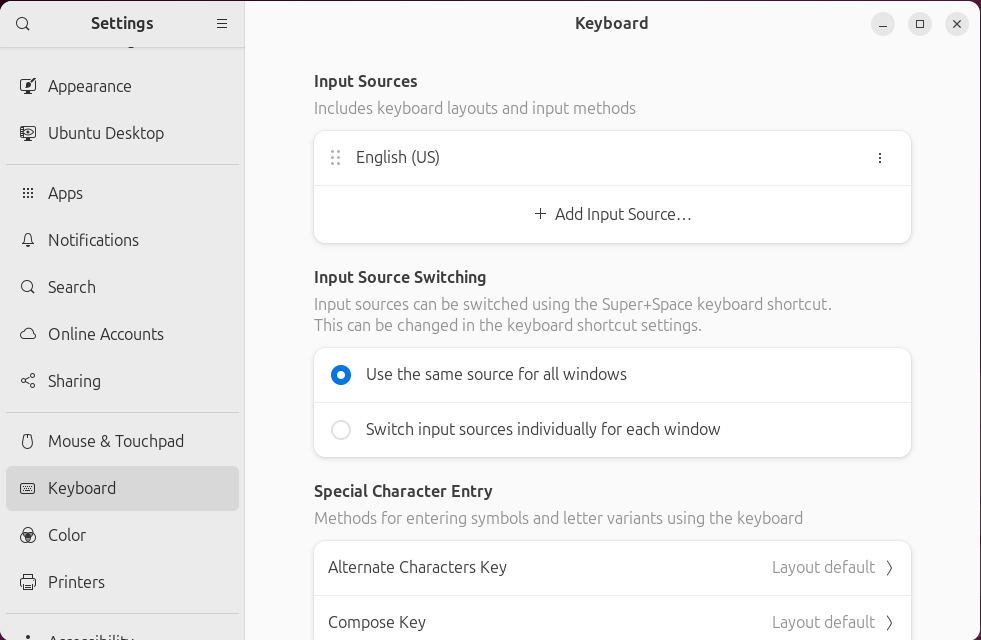
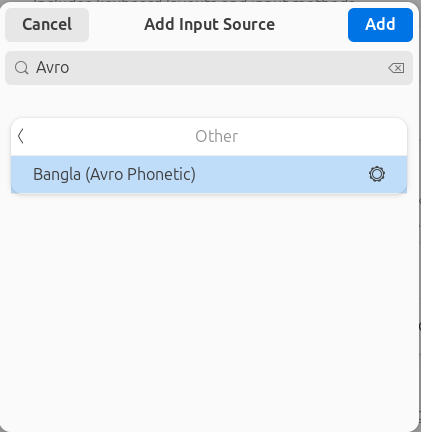
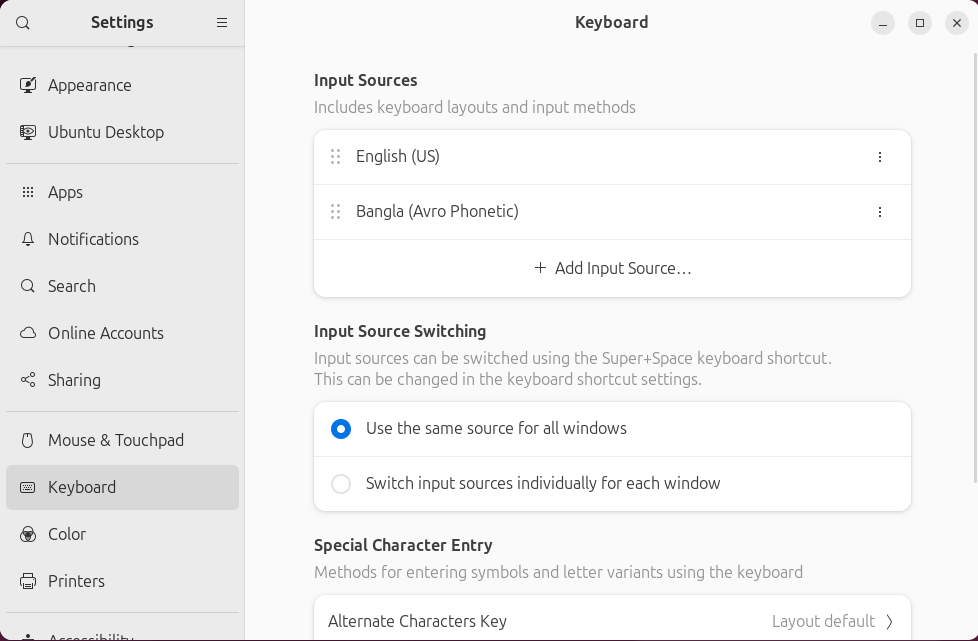
Go to the settings and select keyboard-
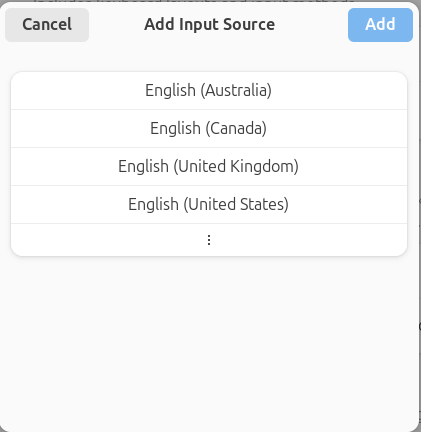
Click
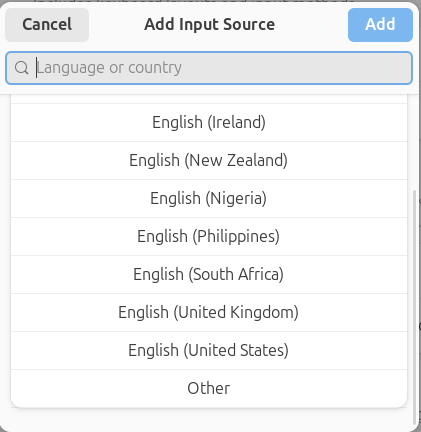
Add Input Sources-Click vertical threedots(⋮)-
Click
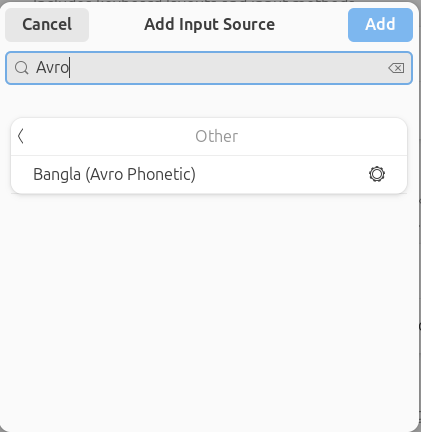
Otherand search forAvro-Select
Bangla (Avro Phonetic)Click
Add-Now you are done!
Bash-
sudo apt-get install ibus-avro
Bash-
reboot
Step \(2\): CLI Setup
First of all, you need to create a folder for storing your fonts-
Bash-
// Create a folder
mkdir -p ~/.local/share/fonts/bangla

// Copy your fonts here
cp /path/to/your/fonts/
*.ttf ~/.local/share/fonts/bangla/

// Example:
// cp ~/Downloads/SolaimanLipi.ttf ~/.local/share/fonts/bangla/
Alternative: Install for all users (needs password)
Bash-
sudo mkdir -p /usr/local/share/fonts/bangla
sudo cp ~/Downloads/
*.ttf /usr/local/share/fonts/bangla/
sudo fc-cache -fv
Update font cache to detect by your machine
Bash-
fc-cache -fv
Verify they are recognized:
Bash-
fc-list | grep -i -E 'solaiman|kalpurush|sutonny'
You should see an ouput-
Ouput-
/home/yourname/.local/share/fonts/bangla/SolaimanLipi.ttf: SolaimanLipi:style=Regular
Create fontconfig rule to prefer your Bangla font for Bengali script This makes your font the top choice whenever Bengali characters need rendering (e.g. "আমি বাংলা লিখি"), but Latin/English still uses Ubuntu/Default fonts. Create a config file in your user directory (affects only you):
Bash-
mkdir -p ~/.config/fontconfig/conf.d
nano ~/.config/fontconfig/conf.d/99-bangla-prefer.conf
Now paste the following script (change the family name if your font shows differently in fc-list):
<?xml version="1.0"?>
<!DOCTYPE fontconfig SYSTEM "fonts.dtd">
<fontconfig>

  <!-- Prefer SutonnyMJ for Bengali script -->
  <match target="pattern">
    <test qual="any" name="lang" compare="contains">
      <string>bn</string>
    </test>
    <test qual="any" name="family">

      <string>sans-serif</string>
    </test>
    <edit name="family" mode="prepend" binding="strong">
      <string>SutonnyMJ</string>
    </edit>
  </match>

  <match target="pattern">
    <test qual="any" name="lang" compare="contains">
      <string>bn</string>
    </test>
    <test qual="any" name="family">
      <string>serif</string>
    </test>
    <edit name="family" mode="prepend" binding="strong">
      <string>SutonnyMJ</string>
    </edit>
  </match>

  <!-- Fallbacks -->
  <match target="pattern">
    <test qual="any" name="lang" compare="contains">
      <string>bn</string>
    </test>
    <edit name="family" mode="append">
      <string>SolaimanLipi</string>
      <string>Kalpurush</string>
    </edit>
  </match>

</fontconfig>
How to know the exact font name? Run the following comman and copy the name shown in bold-
Bash-
fc-list | grep -i sutonny
// Example output:
// /home/username/.local/share/fonts/bangla/SutonnyMJRegular.ttf: SutonnyMJ:style=Regular
Now apply changes-
Bash-
fc-cache -fv
You are now done, but you might check to test which font are being used for বাংলা rendering-
Bash-
LANG=bn_BD.UTF-8 fc-match sans-serif